Mercury Books vs QuickBooks: Should Your Bank Keep the Books?
Bookkeeper.chat ·
Updated

Mercury, the business banking platform, launched Mercury Books on September 16, 2026. Its FAQ is direct about the goal: if you use QuickBooks, Books “is built to replace it, not sync with it.”
Six weeks later, owners are moving. On October 31 a founder on X announced a weekend project: migrating from QuickBooks to Mercury Books. The first reply asked how the migration went and said they might wait until Q1. A day earlier another founder wrote that Books was not the right fit for inventory-based businesses but looked promising for light to medium accrual books. He plans to pilot it in Q4 and move over in 2027, and he disclosed that Mercury has sponsored his events.
Mercury Books vs QuickBooks: the short answer
If you already bank with Mercury and your books are light to medium without inventory, Mercury Books is the cheapest way off QuickBooks right now: it is free until the end of 2026. If you bank somewhere else, it is not an option unless you move your banking too. If your accountant, payroll or industry apps run on QuickBooks, staying is the smaller change.
| Mercury Books | QuickBooks Online | |
|---|---|---|
| Who can use it | Mercury account holders only | Any business |
| Price | Free for all of 2026, then $35 per month | $38 to $340 per month at list price; a free plan has one user and no accountant access |
| Where transactions come from | Mercury banking, cards, invoicing and bill pay; outside banks and cards through Plaid, plus Stripe, PayPal and Gusto | The bank feeds and apps you connect |
| Who does the bookkeeping | Books categorizes and reconciles; you review what it flags | Intuit’s AI categorizes, and on Plus and Advanced it also reconciles; you review its work |
| Your accountant | Invite them with a role; no cap on advisor seats | 2 accountant seats on paid plans, 3 on Advanced |
| Moving your QuickBooks history | Chart of accounts and opening balances only; transaction detail, vendors, invoices and customer lists stay in QuickBooks | Not applicable |
| What is left for you each month | Reviewing flagged transactions in the app | Reviewing the AI’s work, and reconciling yourself on Simple Start and Essentials |
QuickBooks prices are Intuit’s US list prices, checked on November 1 and again on November 8, 2026. New subscribers were offered 50% off for the first three months.
What Mercury Books does
Mercury Books is double-entry accounting built into a Mercury account, so only Mercury customers can use it. Activity from Mercury checking, cards, invoicing and bill pay flows in on its own, and Books categorizes and reconciles it continuously. It produces a P&L, balance sheet and cash flow statement, supports cash or accrual accounting and has a demo you can try before turning it on. It works in US dollars only: invoices in other currencies don’t sync.
Mercury Command, the AI built into Mercury, answers plain-language questions about your spending and GL codes. It also writes journal entries, organizes your chart of accounts and categorizes in bulk. Mercury’s launch post says a full accounting API and an MCP layer for AI agents are coming.
Mercury Books pricing vs QuickBooks pricing
One year of software at list price:
| Plan | Monthly | One year |
|---|---|---|
| QuickBooks Online Simple Start | $38 | $456 |
| QuickBooks Online Essentials | $85 | $1,020 |
| QuickBooks Online Plus | $140 | $1,680 |
| QuickBooks Online Advanced | $340 | $4,080 |
| Mercury Books in 2026 | $0 | $0 |
| Mercury Books from 2027 | $35 | $420 |
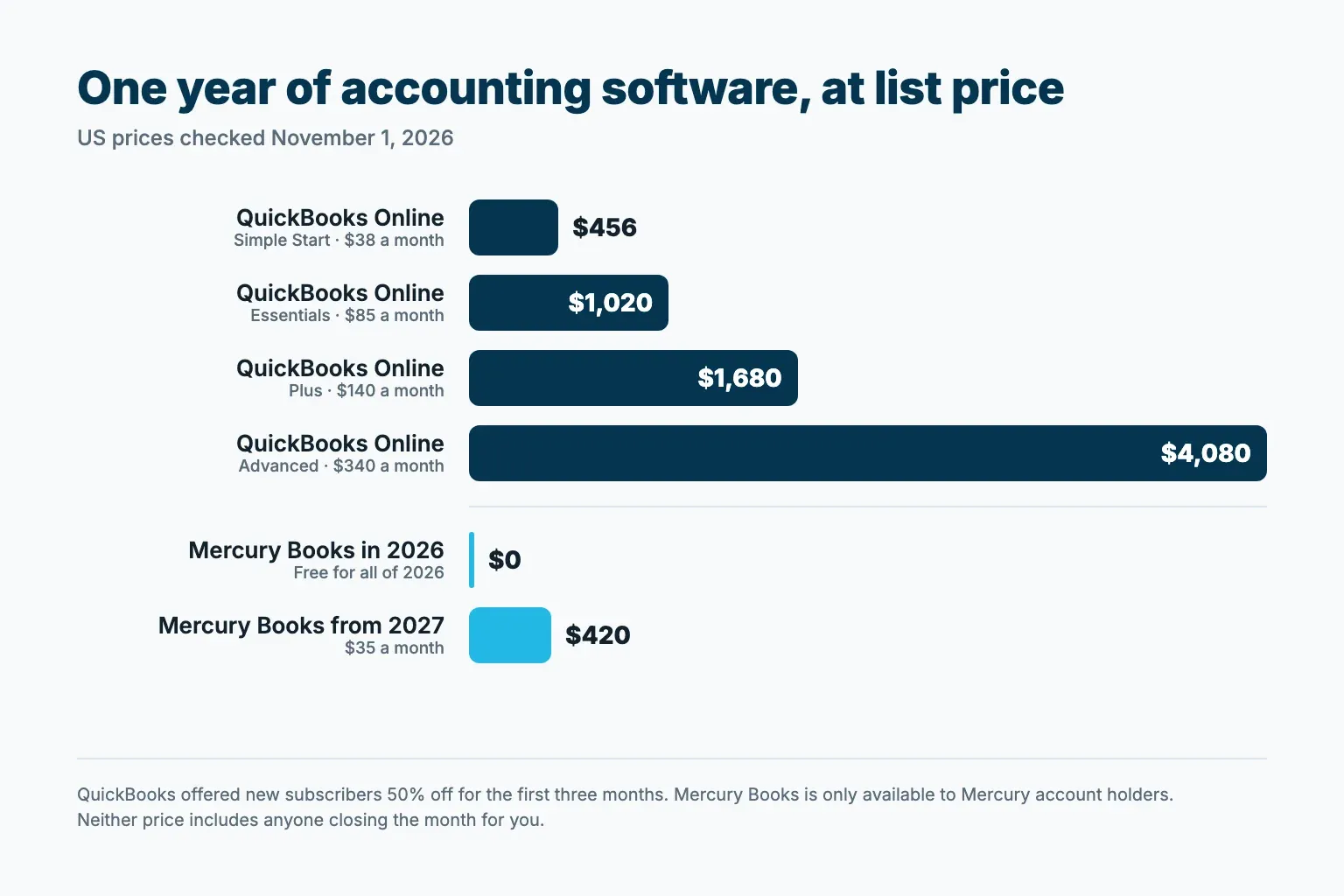
Take an owner on QuickBooks Essentials who already banks with Mercury. Moving on January 1, 2027, they pay $420 for Books that year instead of $1,020, which saves $600. A new QuickBooks subscriber with the 50% offer pays 3 × $42.50 + 9 × $85 = $892.50 in the first year. Intuit also lists QuickBooks Free at $0 for businesses just starting out, with one user and no accountant access.
Neither price includes anyone closing the month. With both tools, someone still reviews flagged transactions, answers questions about unclear payments and decides when the month is done: you, or the accountant you pay. If Mercury matches you with a bookkeeping firm, that firm sets its own price and you pay it directly; the $35 covers only the software.
Which one fits your business
Mercury Books fits if:
- you already bank with Mercury, or are happy to move your banking;
- your books are light to medium, in US dollars, and you don’t track inventory;
- you are fine reviewing flagged transactions in an app each week;
- your accountant is willing to work in Mercury.
QuickBooks fits if:
- your accountant, payroll or industry apps already run on QuickBooks;
- you bank with several institutions;
- you need its reports and app ecosystem.
Moving from QuickBooks to Mercury Books: now or in January?
The timing question from that reply on X has two clean answers.
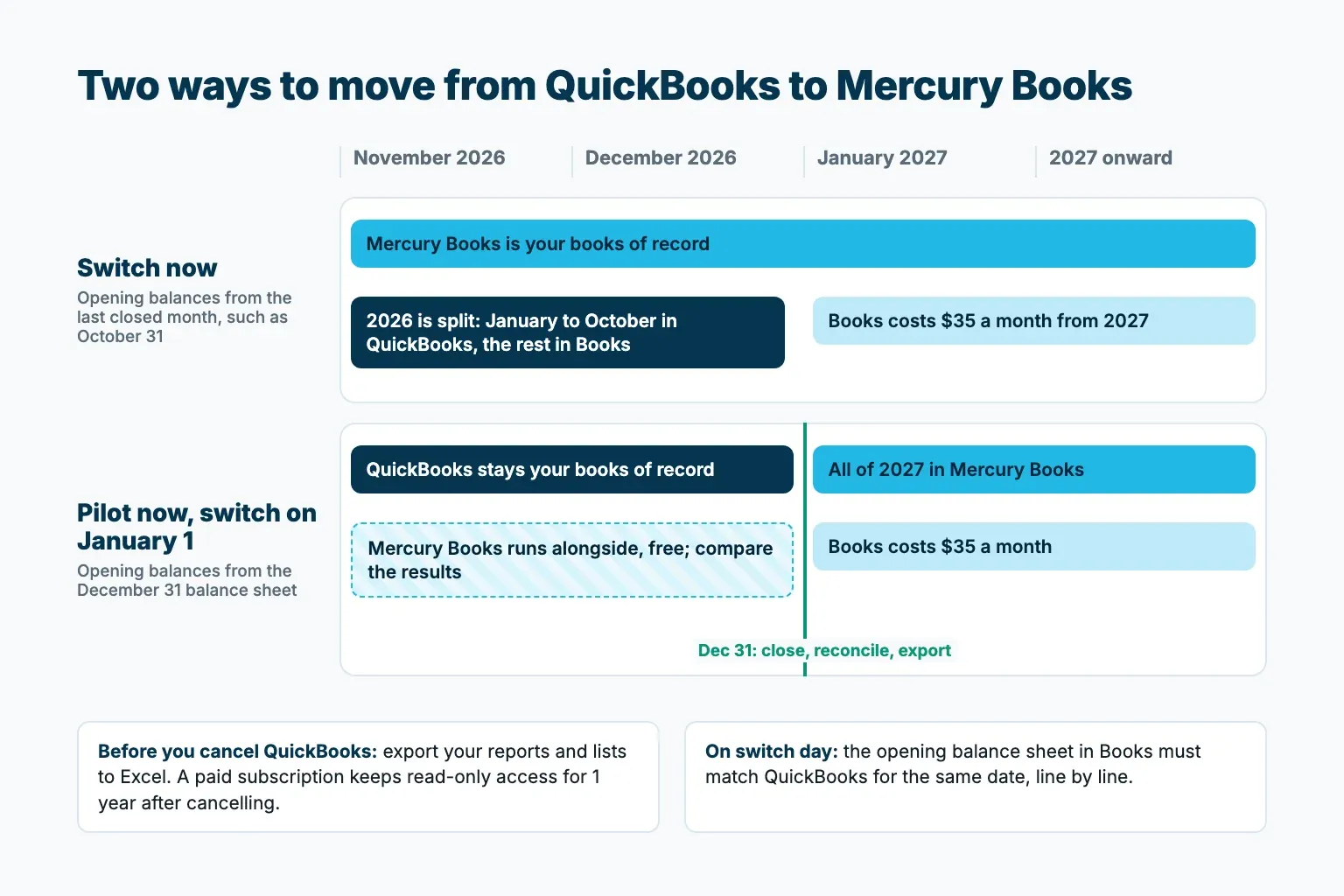
Switch now
Start Mercury Books with opening balances from the last month you closed in QuickBooks, for example October 31. Because that is mid-year, Mercury’s migration guide adds a step: enter each income and expense account’s year-to-date total from QuickBooks as its opening balance too. You use the free months, but 2026 is split between two systems, and your year-end reports have to combine both.
Pilot now, switch on January 1, 2027
Keep QuickBooks as your books of record through December and run Books alongside it while it is free. Compare the categories and reports for November and December. If they hold up, close and reconcile 2026 in QuickBooks, export everything and start 2027 in Mercury Books with opening balances from the December 31 balance sheet. All of 2027 then lives in one system, and your tax preparer gets 2026 from QuickBooks.
What moves to Mercury Books, and what stays behind
Mercury’s migration guide puts the setup at 30 to 45 minutes. You bring over your chart of accounts through Mercury’s conversion spreadsheet (every account needs a number in Books), then enter one opening balance per account from the QuickBooks balance sheet on your switch-over date. From the start date, Mercury accounts sync on their own, and outside banks and cards sync once you connect them through Plaid.
Transaction detail before the start date stays in QuickBooks, along with vendor information, invoices and customer lists. Mercury bills and invoices dated after the start date sync to Books; invoices from other tools don’t.
Export before you cancel QuickBooks
In QuickBooks Online, go to Settings, select Export data in the Tools column, choose the reports and lists you need and export them to Excel as one .zip file. Estimates, purchase orders, customer statements, attachments, recurring templates, the chart of accounts and products and services are exported separately. After you cancel a paid subscription, Intuit keeps your data available read-only for 1 year.
Questions to ask Mercury first
- how classes, attachments and recurring transactions are handled, since the migration guide doesn’t cover them;
- which of your outside banks and cards connect through Plaid, and which need CSV imports;
- how to change the start date later if you need to (moving it to a later date goes through support).
The mistake that costs the most
It is cancelling QuickBooks before the last month is reconciled and the opening balances tie out.
On the day you switch, the balance sheet in Mercury Books has to match QuickBooks’ balance sheet for the same date: cash, cards, loans, money customers owe you, bills you owe, and equity. Check it line by line. Say cash matches at $48,210, but the credit card shows $3,420 in QuickBooks and $3,240 in the new books. That $180 gap is two digits swapped when the opening balance was typed. Caught on day one, it takes a minute to fix; caught in April, it means reworking every reconciliation since January.
Mercury names two other causes of mismatched balances: an account that got an opening balance and was also connected through Plaid, and a start date that isn’t the day after the switch-over date. Both count the same money twice.
For accountants: when a client moves to Mercury Books
For the client’s accountant, most of a move to Books is the cutover. Mercury’s help center covers the mechanics; settle these points with the client before the switch:
- The client invites you to their Mercury account with a role. To open Books, the role needs the all accounts and accounting permissions, plus invoice creation and recipient management for payment matching and vendor records. The Mercury Books toggle on a role turns on all four. Your firm then opens each client’s books from Mercury’s Advisor Portal, and advisor seats are not capped.
- Agree the switch-over date and reconcile QuickBooks through it. The Books start date has to be the next day, or Mercury transactions already in QuickBooks get counted twice. A mid-year switch also needs year-to-date income and expense totals entered as opening balances.
- Since the history doesn’t move, export what you will need and keep the client’s QuickBooks file read-only for prior periods.
- Before the client cancels anything, compare every opening balance in Books with the QuickBooks balance sheet for the switch-over date. Mercury’s own guide says to have the accountant review this step.
- Mercury support explains how Books works, but it doesn’t give accounting or tax advice and doesn’t review or certify a client’s books. Categorization calls, the accounting method and year-end readiness stay with you.
- Books works in US dollars only, so it doesn’t suit a client who invoices in other currencies.
For clients who stay on QuickBooks Online or Xero, Bookkeeper.chat takes the monthly close off your staff. Its AI Bookkeeper prepares the month and emails the client about missing documents. An AI Reviewer checks every entry and explains its findings, and your senior approves the Excel close packet before anything is posted to the client’s ledger. You can try it on a month your firm has already closed: Request a Closed-Books Test.
FAQ
Is Mercury Books free?
Yes, through December 31, 2026. From January 1, 2027, Mercury lists it at $35 per month. It is a separate subscription, not included in Mercury Plus or Mercury Pro.
Do I need a Mercury account to use Mercury Books?
Yes. Once your Mercury account is approved, you turn Books on from the dashboard.
Does Mercury Books sync with QuickBooks?
No. Mercury says Books is built to replace QuickBooks. If you want to keep QuickBooks, Mercury’s banking connects to accounting tools through its accounting integrations.
Does Mercury Books bring over my QuickBooks history?
No. You bring over your chart of accounts and opening balances. Transaction detail, vendor information, invoices and customer lists stay in QuickBooks, so export them before you cancel.
Is Mercury a bank?
Mercury says it is a fintech company, not an FDIC-insured bank. Its banking services are provided through Choice Financial Group and Column N.A., Members FDIC.
How long can I see my QuickBooks data after I cancel?
For a paid subscription, 1 year of read-only access. Export your data before you cancel anyway.
Can my accountant work in Mercury Books?
Yes. You invite them with a role that includes the Books permissions, and there is no cap on advisor seats. If you don’t have an accountant, Mercury can introduce you to a partner bookkeeping firm, which sets its own price.
Is there a Mercury Books alternative if I don’t bank with Mercury?
QuickBooks Online and other accounting software work with any bank. Books itself requires a Mercury account, though once you have one it can pull in outside banks and cards through Plaid.
Sources
- Mercury Books product page and FAQ, checked November 8, 2026
- Mercury: Introducing Mercury Books, September 16, 2026
- Mercury Help Center: Moving from QuickBooks Online (QBO) to Mercury Books, checked November 8, 2026
- Mercury Help Center: Getting started with Mercury Books, checked November 8, 2026
- Mercury Help Center: Working with a bookkeeper in Mercury Books, checked November 8, 2026
- Mercury Help Center: What Mercury Books can and can’t help with, checked November 8, 2026
- Intuit: QuickBooks Online pricing, checked November 1 and November 8, 2026
- Intuit: Export your QuickBooks Online data, updated August 3, 2026
- Intuit: What happens to my QuickBooks Online data after I cancel?, updated August 5, 2026
- Posts on X by @areksds and @DanielKuney on October 31, 2026, and by @youderian on October 30, 2026